 Skip to content

Struggling to estimate your daily calorie needs or figure out the right macro split for your fitness goals? You’re not alone. Many health enthusiasts find themselves guessing at nutrition targets, only to see inconsistent results. Fitness calculators offer a science-backed shortcut to personalized planning, translating your stats into actionable numbers for training and eating. This guide walks you through selecting the right tools, entering data correctly, and interpreting results to optimize your health journey with confidence.
Table of Contents
- Understanding Types Of Fitness Calculators And Their Purpose
- How To Correctly Input Data And Select Formulas For Accurate Results
- Common Mistakes To Avoid And Troubleshooting Tips
- Tracking Your Results And Adjusting Over Time For Success
- Explore Personalized Nutrition And Fitness Solutions At Dietium
- Frequently Asked Questions
Key takeaways
| Point | Details |
|---|---|
| Accurate input is essential | Age, weight, height, sex, activity level, and goal must be current and precise for reliable estimates. |
| Mifflin-St Jeor is preferred | This BMR formula offers the best accuracy for most individuals compared to older equations. |
| Track and adjust biweekly | Monitor progress every 2-3 weeks and recalibrate inputs based on real-world results. |
| Expect ±10-15% variance | Calculators provide starting points, not absolutes; prioritize trends over single data points. |
| Extremes need lab testing | Athletes and obese individuals may see larger errors; indirect calorimetry offers precision for outliers. |
Understanding types of fitness calculators and their purpose
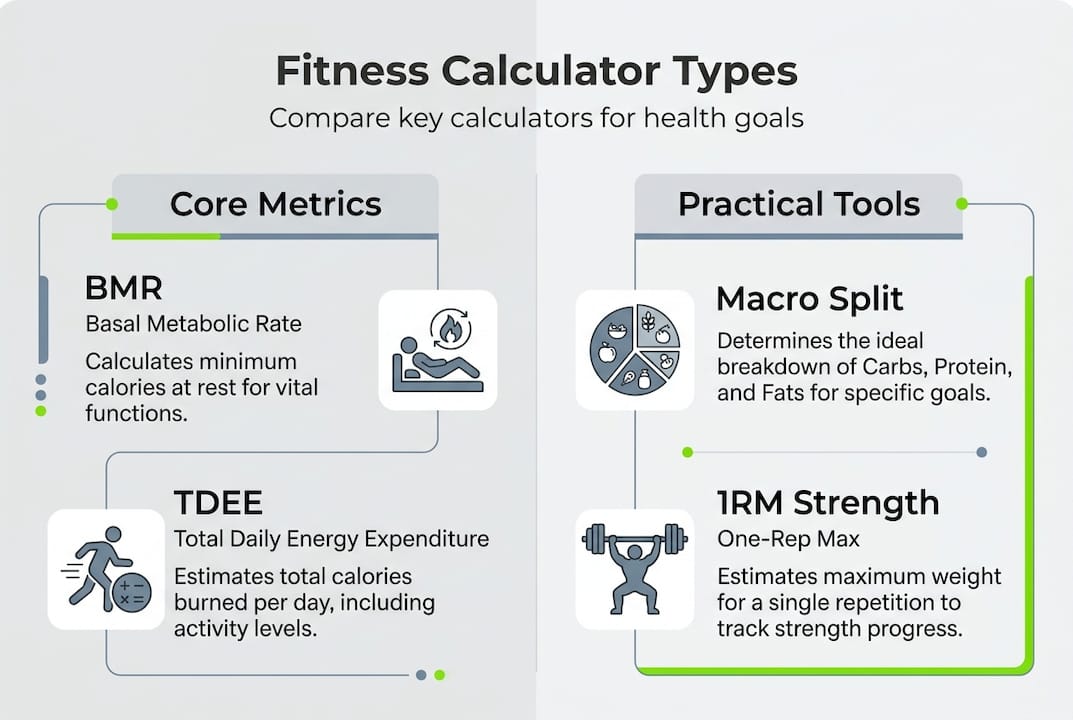
Fitness calculators come in several varieties, each designed to estimate a specific metric that supports your training and nutrition plan. Fitness calculators typically include BMR/TDEE for calorie needs, macro splitters, BMI/body fat estimators, one-rep max predictors, and activity-based calorie burners like steps-to-calories. Knowing which tool to use for each goal helps you build a complete picture of your health profile.
Basal Metabolic Rate (BMR) calculators estimate the calories your body burns at rest, forming the foundation for daily energy needs. Total Daily Energy Expenditure (TDEE) builds on BMR by multiplying it with an activity factor, accounting for exercise and daily movement. Macro splitters then divide TDEE into protein, carbs, and fats based on your fitness goal, whether muscle gain, fat loss, or maintenance. BMI and body fat estimators assess body composition, while one-rep max (1RM) calculators predict your strength ceiling for exercises like bench press or squat.
Methodologies vary by calculator type: BMR via Mifflin-St Jeor, macros from TDEE percentages, 1RM formulas like Epley, and METs for activity calories. The Mifflin-St Jeor equation is the gold standard for BMR because it accounts for sex differences and modern body composition better than older formulas like Harris-Benedict. Activity multipliers for TDEE range from 1.2 for sedentary lifestyles to 1.9 for competitive athletes, letting you scale calorie needs to match your routine. For strength training, the Epley formula estimates 1RM by combining reps and weight lifted, helping you program progressive overload.
Here’s a quick comparison of common calculator types:
| Calculator Type | Primary Output | Typical Formula | Best For |
|---|---|---|---|
| BMR | Resting calories | Mifflin-St Jeor | Baseline energy needs |
| TDEE | Total daily calories | BMR × activity factor | Daily calorie targets |
| Macro Splitter | Protein/carbs/fats (g) | TDEE × % ratios | Meal planning |
| 1RM Predictor | Max lift weight | Epley or Brzycki | Strength programming |
| Steps-to-Calories | Activity calories | METs × duration | Activity tracking |
Understanding these tools sets the stage for accurate input and smart application. Essential health calculators work together to create a holistic view of your fitness needs. If you’re curious about body composition specifically, body fat calculator tools offer deeper insight into lean mass versus fat mass. Once you know your TDEE, learning how to calculate macros becomes straightforward.
How to correctly input data and select formulas for accurate results
Precise data entry and formula selection determine whether your calculator outputs are useful or misleading. Follow these steps to maximize accuracy:
- Gather current stats: weight (pounds or kilograms), height (inches or centimeters), age (years), and biological sex.
- Choose Mifflin-St Jeor for BMR if the calculator offers multiple formulas, as it provides the best general accuracy.
- Estimate your activity level honestly: sedentary (1.2), lightly active (1.375), moderately active (1.55), very active (1.725), or athlete (1.9).
- Set your primary goal: fat loss, muscle gain, or maintenance, which adjusts calorie and macro recommendations.
- Review the output and cross-check with a second calculator to confirm consistency.
To use calculators effectively: input accurate stats, select formula like Mifflin-St Jeor for BMR, multiply by activity factor for TDEE, adjust macros by goal, and track results after 2-3 weeks. Activity multipliers are critical because a sedentary office worker and a CrossFit athlete with identical BMRs will have vastly different TDEEs. Underestimating activity leads to undereating and stalled progress, while overestimating can prevent fat loss.

Macro adjustments follow goal-specific ratios. For muscle gain, prioritize protein at 1.0-1.2 grams per pound of body weight, moderate carbs for energy, and fats around 20-30% of total calories. Fat loss benefits from similar protein to preserve muscle, lower carbs, and moderate fats. Maintenance balances all three macros evenly. Most calculators automate these splits, but understanding the logic lets you tweak for personal preference or dietary restrictions.
Pro Tip: Recalculate your BMR and TDEE every time you lose or gain 5-10 pounds, or if your activity level changes significantly. Your calorie needs shift with body weight, so outdated inputs produce outdated targets. Setting a calendar reminder every three weeks ensures you stay aligned with current needs.
If you want a deeper dive into energy expenditure, this guide on how to calculate TDEE breaks down the math step by step. Pairing TDEE with macro calculations creates a complete nutrition blueprint tailored to your body and goals.
Common mistakes to avoid and troubleshooting tips
Even with the best calculators, input errors and misinterpretations can derail your results. Recognizing these pitfalls helps you troubleshoot and refine your approach.
Frequent mistakes include:
- Using outdated weight or height measurements, especially after recent changes.
- Selecting the wrong activity multiplier, often overestimating exercise intensity.
- Mixing units (pounds with centimeters, or kilograms with inches) without converting.
- Ignoring the difference between gross and net calories burned during exercise.
- Failing to update inputs after weight loss or lifestyle shifts.
Input errors are common; overestimates occur in athletes and obese individuals; recalibrate with weight changes; extremes require lab tests. Standard BMR formulas assume average body composition, so highly muscular athletes may see underestimated needs, while individuals with obesity may see overestimates due to lower metabolic activity in adipose tissue. If your results don’t match real-world progress after three weeks, suspect formula limitations rather than personal failure.
Fitness calculators offer ±10-15% accuracy for most users. Treat outputs as starting points, not gospel. Lab-based indirect calorimetry provides gold-standard precision for athletes, bodybuilders, or those with metabolic conditions, but costs hundreds of dollars. For the majority, tracking trends with calculators and adjusting based on scale, measurements, and performance delivers practical results.
Troubleshooting tips:
- Cross-check calculator results with wearable device data, but recognize wearables also carry error margins.
- If weight stalls for three weeks despite a calorie deficit, reduce TDEE by 100-200 calories or increase activity.
- If energy crashes on a deficit, ensure protein intake is adequate and consider a diet break.
- For strength plateaus, verify 1RM calculations with actual tested maxes every 4-6 weeks.
Pro Tip: Focus on weekly averages rather than daily fluctuations. Water retention, sodium intake, and menstrual cycles can swing scale weight by several pounds overnight. Comparing week-to-week averages smooths out noise and reveals true trends.
Understanding how to track progress in health and fitness beyond the calculator helps you validate outputs and make informed adjustments.
Tracking your results and adjusting over time for success
Calculators provide the roadmap, but tracking your journey confirms you’re on course. Monitoring body metrics, performance, and subjective energy levels against calculator predictions reveals whether your inputs and formulas are dialed in.
Key metrics to track:
- Scale weight: Daily weigh-ins averaged weekly to account for fluctuations.
- Body measurements: Waist, hips, chest, arms, and thighs measured biweekly.
- Strength: Reps, sets, and weight lifted for core exercises logged per session.
- Energy and recovery: Subjective ratings of workout quality, sleep, and mood.
- Progress photos: Front, side, and back images every four weeks for visual comparison.
Here’s a sample tracking table to compare calculator predictions with real outcomes:
| Week | Predicted Weight Change | Actual Weight Change | Predicted Strength Gain | Actual Strength Gain | Adjustment Needed |
|---|---|---|---|---|---|
| 1-2 | -1 lb | -0.5 lb | +5 lb bench | +5 lb bench | Monitor |
| 3-4 | -1 lb | 0 lb | +5 lb squat | +2.5 lb squat | Reduce calories 100 |
| 5-6 | -1 lb | -1.5 lb | +5 lb deadlift | +10 lb deadlift | Maintain plan |
Track for 2-3 weeks and adjust based on progress; focus on trends not absolute accuracy; recalibrate biweekly. If your actual results lag predictions, reduce calorie estimates by 5-10% or increase activity slightly. If you exceed predictions, consider raising calories to avoid excessive deficits that harm recovery and muscle retention. The goal is sustainable progress, not rapid swings that compromise long-term adherence.
Wearable fitness trackers offer real-time calorie burn estimates, but treat them cautiously. Devices often overestimate expenditure by 10-30%, especially during resistance training. Use wearable data as supplementary feedback, not primary input. Combining calculator baselines with manual tracking of weight, measurements, and performance creates a reliable feedback loop.
Pro Tip: Celebrate non-scale victories like improved sleep, better workout performance, or fitting into smaller clothes. These indicators often precede measurable weight changes and keep motivation high during plateaus. Consistency beats perfection, and tracking multiple metrics prevents fixation on any single number.
For comprehensive guidance on monitoring progress, explore tracking fitness progress and tracking body measurements for progress.
Explore personalized nutrition and fitness solutions at Dietium
Mastering fitness calculators gives you a powerful foundation for personalized health planning, but pairing those insights with tailored meal plans and professional nutritional assessment takes results to the next level. Dietium offers AI-powered tools that integrate your calculator outputs into custom meal plans, recipe suggestions, and fitness routines aligned with your unique goals. Whether you’re refining macros for muscle gain or adjusting calories for fat loss, personalized meal plans simplify execution and remove guesswork. Combine calculator precision with nutritional assessment methods to identify gaps and optimize micronutrient intake. Ready to level up your tracking? Explore tracking fitness progress tools that sync with your personalized plan for seamless monitoring.
Frequently asked questions
What data do I need to input for fitness calculators?
Age, sex, weight, height, activity level, and fitness goal are usually required for accurate estimates. Current and precise data ensure the calculator generates reliable personalized results. Outdated or incorrect inputs produce misleading outputs that can derail your progress.
How often should I update my fitness calculator inputs?
Update inputs every 2-3 weeks or after significant weight or activity changes. Adjust based on tracking results to stay aligned with evolving goals. Your calorie needs shift as your body composition and routine change, so regular recalibration keeps targets accurate.
Are fitness calculators accurate for athletes or obese individuals?
Standard formulas may overestimate or underestimate in athletes or obese people due to body composition differences. Prediction equations can overestimate BMR by 100-250 kcal in athletes; expect ±10-15% accuracy range. Lab methods like indirect calorimetry are preferred for high accuracy in extremes, but calculators still serve as useful starting points when adjusted by empirical tracking.
Can I use multiple calculators to cross-check results?
Yes, comparing outputs from two or three reputable calculators helps identify outliers and build confidence in your targets. Look for consistency within 100-200 calories for TDEE and within 5-10 grams for macros. If results vary widely, prioritize calculators using Mifflin-St Jeor for BMR and transparent activity multipliers.
What should I do if my results don’t match calculator predictions?
First, verify your inputs are accurate and current, especially weight and activity level. If inputs are correct but progress stalls, adjust calories by 5-10% and monitor for another two weeks. Consider factors like sleep quality, stress, and adherence to the plan, as these influence results beyond calculator math. Persistent discrepancies may warrant consulting a registered dietitian or getting lab-based metabolic testing.


